|
|
| Reference Number: AA-00416 Views: 5086 Created: 2014-08-08 15:31 Last Updated: 2014-08-08 15:36 |
0 Rating/ Voters
|
 |
Default Settings for Pin Pad Verifone PINpad 1000SE
When setting up the pin pad most of them use a Serial-to-USB adapter, make sure this is installed correctly and make note of the COM# port in order to set it up correctly in Artisan.
Set it up in Artisan: - The settings in the image below are the defaults for the pin pad, except PIN Pad Port which can be different depending on the port the device is connected to.
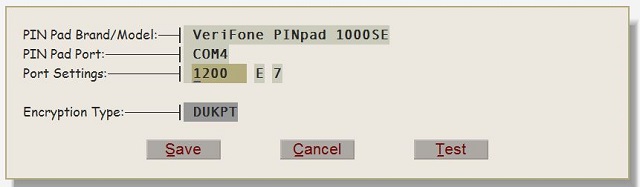
- Make sure these are the same as the settings in the pin pad itself from the Windows Device Manager.
- To do this go to Windows Device Manager.
- Look for the Pin Pad on the list of devices under Ports
- Right-click and check the properties.
- Check the Port Settings on the Port Tab
- Make sure they are the same as the image above. They need to match with Artisan POS
|
| |
| |
| |
|
|
|
|
|


